Open Source
Kilo Code:
Kilo Code:
The Open-Source AI Coding Agent
1.5M Users · 500+ Models · Zero Markup
1.5MActive Users
500+AI Models
$0Markup on API
OSSOpen Source
Why Do Developers Struggle? And How Do We Fix It?
⚠ The Problem
Coding is slow and repetitive
- ✗Memorizing syntax and docs
- ✗Copy-pasting boilerplate
- ✗Manually debugging for hours
- ✗Switching between 10 tabs
- ✗Writing the same patterns over and over
✦ The Solution
AI agents automate the boring parts
- ✓Kilo reads your codebase and understands it
- ✓Writes new features from plain English
- ✓Finds and fixes bugs automatically
- ✓Handles the full workflow — not just suggestions
- ✓You focus on ideas. Kilo handles execution.
Kilo Code = your AI developer that never sleeps
What Is Kilo Code?
Open-source AI coding agent — built on the open-source community's best tools
💡 Analogy: Think of Kilo as a junior developer that never sleeps — it reads your codebase, writes files, runs commands, and fixes bugs
The Problem: Traditional coding is slow, repetitive, and error-prone. AI agents like Kilo automate the boring parts.
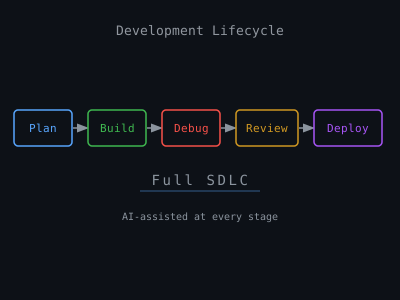
- Covers the full SDLC (Software Development Life Cycle — from planning to deployment): plan → build → debug → review → deploy
- NOT just autocomplete — it executes the whole workflow
- Reads & writes files, runs terminal commands (CLI), browses docs
- Works inside your IDE and in the cloud
vs Cursor / Claude Code / Copilot
They do one thing. Kilo does everything.
They do one thing. Kilo does everything.
Plan
Build
Debug
Review
Deploy
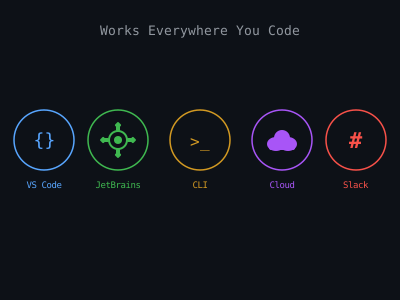
5 Ways to Deploy Kilo
VS Code Extension Primary
Install from VS Code Marketplace — works in your existing editor
JetBrains IntelliJ · PyCharm · WebStorm
Full plugin support for the JetBrains IDE ecosystem
CLI Terminal-based
Run Kilo directly from your terminal — no IDE required
Cloud Agents Web Browser
Spin up agents in the browser — no local setup needed
Slackbot Team Collab
Trigger agents directly from Slack — perfect for team workflows
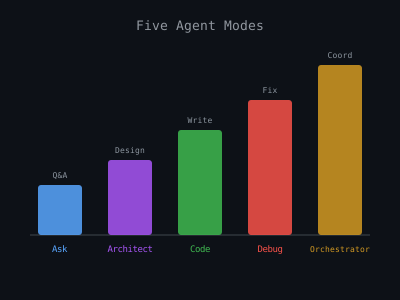
The 5 Agent Modes
Ask
Questions, explanations, docs — read-only, no file changes
Use when: you want to understand code without changing it
Use when: you want to understand code without changing it
Architect
System design, planning, architecture — high-level thinking
Use when: starting a new feature and you need a plan first
Use when: starting a new feature and you need a plan first
Code
Write & edit files — the workhorse mode
Use when: you need to write or edit files
Use when: you need to write or edit files
Debug
Fix errors, run tests, read logs — focused fault-finding
Use when: something is broken and you need it fixed
Use when: something is broken and you need it fixed
Orchestrator
Coordinates all modes for complex multi-step tasks
Use when: your task is too big for one mode — like a project manager
Use when: your task is too big for one mode — like a project manager
💡 Team analogy: Ask = Consultant · Architect = Tech Lead · Code = Developer · Debug = QA Engineer · Orchestrator = Project Manager
Orchestrator Mode Deep Dive
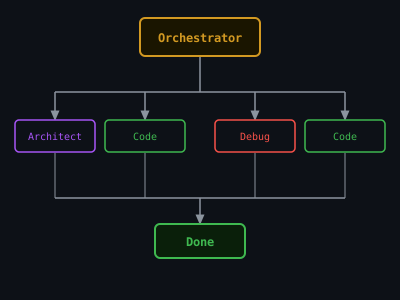
Orchestrator is like a project manager — it breaks your request into tasks and assigns each to the right specialist.
Example: "Build me a todo app" — one sentence, Kilo does the rest
1
🏗️ Architect → Plan the system
Decides the structure: database, API, and UI layout
2
⌨️ Code → Build frontend
Writes the screens users actually see
3
🐛 Debug → Fix errors
Runs tests, reads error logs, patches issues automatically
4
⌨️ Code → Build backend API
Writes the server logic that stores and retrieves data
5
🎯 Orchestrator → Validate integration
Checks everything works together end-to-end
⚡ Multiple tasks run at the same time — so it's faster than doing them one by one
You type one prompt. Kilo writes hundreds of lines across multiple files.
Model Selection & Auto Routing
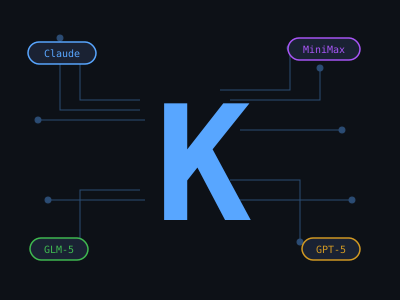
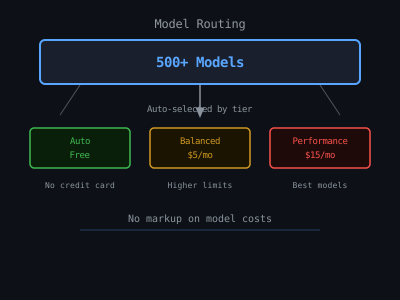
- 500+ models: Claude, GPT-5, MiniMax, GLM-5, Nemotron & more
- 3 Auto tiers — Kilo picks the best model for each task
- Free tier: GLM-5, Nemotron-3-super — real frontier models, $0
- PinchBench: Kilo's proprietary quality/cost benchmark
- Real usage stat: 23% of Code mode tasks use Free tier
Kilo Auto Free
GLM-5, Nemotron-3-super — zero cost, real quality
Kilo Auto Balanced
Best quality/cost ratio — auto-selected per task type
Kilo Auto Performance
Top frontier models — maximum capability, no compromise
Pricing: Zero Markup
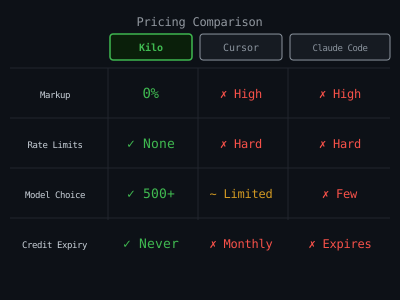
✅ Pay-as-you-go — cost price passthrough, no margin
✅ No credit expiration — your balance never disappears
✅ No rate limits — use as much as you need
✅ No hidden fees — what you see is what you pay
| Feature | Kilo | Cursor | Claude Code |
|---|---|---|---|
| Markup on API | $0 | ~20-40% | ~20% |
| Model choice | 500+ | Limited | Claude only |
| Credit expiry | Never | Monthly | Monthly |
| Free tier models | Yes | No | No |
| Open source | Yes | No | No |
KiloClaw: Managed AI Agent Hosting
KiloClaw = Kilo Code, but running 24/7 in the cloud as your personal AI agent.
- Provision OpenClaw directly from the Kilo Dashboard
- Same 500+ models & credits as the coding agent
- Each user gets their own isolated environment (like a private sandbox)
- Use cases: answer questions on Slack, monitor your codebase, automate repetitive tasks
🔒 Independent Security Audit
Andrew Storms · February 2026 · 10-day engagement
Andrew Storms · February 2026 · 10-day engagement
Independent security audit
Tested against 30 real attack scenarios · all tests passed
Result: no security holes found
No cross-tenant access · no prompt injection findings
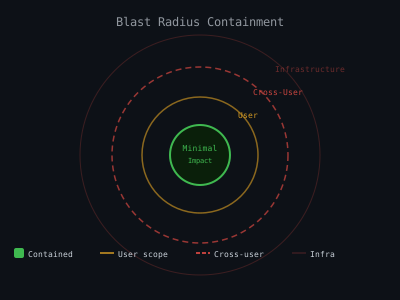
Agent Security & Blast Radius
"Blast Radius" = security term for how much damage can happen if something goes wrong
Minimal — Only this chat is affected
User — Your files and API keys could be exposed
Cross-User — Other users' data could leak — bad ⚠️
Infrastructure — Entire server compromised — very bad 🔴
KiloClaw approach:
🏖️ Each user runs in a private sandbox environment
🔑 Your permissions are locked to your account — prompts can't trick the system
🔐 Encrypted storage + TLS + fail-secure auth
🏖️ Each user runs in a private sandbox environment
🔑 Your permissions are locked to your account — prompts can't trick the system
🔐 Encrypted storage + TLS + fail-secure auth
Before using any AI agent, ask: what's my blast radius?
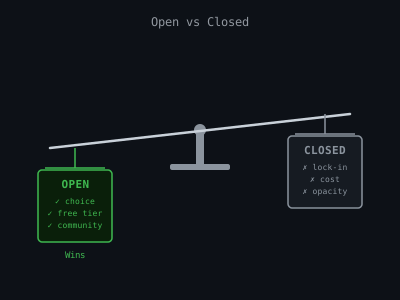
Open vs Closed: The Big Picture
Open: Kilo · Roo Code · Cline
Model choice · community-driven · transparent · no lock-in
Closed: Cursor · Claude Code · Copilot
Lock-in · opacity · premium pricing · one model stack
Kilo's bet: models commoditize → the platform wins
- When GPT-5 and Claude 4 cost cents, who you trust matters more than who you use
- 1.5M users already choosing the open path
- Open source = community fixes bugs, adds models, improves faster
Key Takeaways
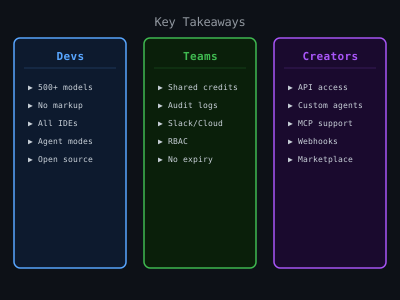
For Devs
Free frontier models · full SDLC coverage · zero model lock-in
For Teams
KiloClaw managed hosting · security-audited · parallel agents
For Creators
Blast radius angle · open vs closed debate · PinchBench leaderboard
🔗 Links:
kilo.ai ·
PinchBench leaderboard ·
KiloClaw white paper
kilo.ai
Open Source
500+ Models